
Caribbean organisations have moved their email, files and core systems to Microsoft 365, Google Workspace and cloud platforms. The providers secure their infrastructure, but customers remain responsible for how accounts, access and data are configured. Most cloud breaches begin with settings the customer controls.
Dawgen Global illustration
A professional services firm moves its email and documents to the cloud. The migration goes smoothly. Staff can work from anywhere. The IT provider sets up accounts, copies the files and closes the project.
A year later, a client receives an invoice from the firm with new bank details and pays it. The invoice was sent from a real staff mailbox, compromised months earlier with a reused password. The attacker had set up a hidden rule forwarding every email mentioning “invoice” to an external address. Multi-factor authentication had never been enforced. Audit logging had never been switched on, so it took weeks to work out what had happened.
Nothing was wrong with the cloud platform itself. Everything that went wrong was a setting the firm controlled.
The shared responsibility model
Cloud providers such as Microsoft, Google and Amazon invest heavily in securing their data centres, networks and platforms. That is their responsibility. But how a customer configures its own accounts, access, sharing and data remains the customer’s responsibility. This division is known as the shared responsibility model.
Many organisations misunderstand it. They assume that moving to a well-known cloud provider means security is taken care of. In reality, default settings are often designed for convenience rather than security, and many important protections must be switched on and configured deliberately.
| Most cloud breaches are not caused by the provider. They are caused by settings the customer controls. |
Identity is the new perimeter
In the past, organisations protected themselves with a network boundary: a firewall around the office. In the cloud, there is no single boundary. Email and files can be reached from anywhere in the world by anyone with the right username and password.
This makes identity, meaning user accounts and how people prove who they are, the most important control. The essentials are:
Multi-factor authentication for every user. A password alone is not enough. Passwords are stolen through phishing, reused across sites and exposed in breaches. Multi-factor authentication stops most account takeover attempts. It should cover every user, not just executives or IT staff.
Conditional access policies. These rules decide when and how people can sign in, for example requiring stronger verification from unfamiliar locations or blocking sign-ins from countries where the organisation has no staff.
Separate administrator accounts. Administrators should use separate accounts for administrative tasks and standard accounts for everyday email and browsing. This limits the damage if an everyday account is compromised.
Disabling legacy sign-in methods. Older email protocols that do not support multi-factor authentication give attackers a way around it. They should be switched off.
Email: the main target
Cloud email is the starting point for many attacks, particularly business email compromise, where attackers use a compromised or imitated mailbox to send fraudulent payment instructions.
Key protections include anti-phishing and safe link settings in the email platform; blocking automatic forwarding to external addresses, which attackers use to monitor conversations; regular checks for suspicious inbox rules; and email domain authentication using SPF, DKIM and DMARC records, which make it much harder for criminals to send emails that appear to come from your domain.
DMARC deserves special mention. Many Caribbean organisations have not configured it, which means anyone can send email that appears to come from their domain. Properly configured, it protects customers and suppliers from impersonation and improves the delivery of legitimate email.
Files: sharing safely
Cloud file platforms make sharing easy, sometimes too easy. Files shared publicly or with “anyone with the link” can be accessed by people outside the organisation, and links are often forwarded far beyond their intended audience.
A sharing review identifies files and folders exposed externally, tightens default sharing settings and introduces controls such as expiry dates for external links. For organisations handling personal or sensitive data, data loss prevention rules can detect and block the sharing of information such as identification numbers, account details or health information.
Logging: seeing what happened
When something goes wrong, logs are how you find out what happened. In many cloud platforms, detailed audit logging must be enabled and retention periods extended. Without logs, investigations stall, insurance claims become harder and regulatory reporting becomes guesswork.
Logs are also the foundation of monitoring. Cloud sign-in and activity logs can feed a managed SOC, which watches for signs of account compromise such as impossible travel, unusual inbox rules and mass file downloads.
Backup: the cloud is not a backup
Cloud platforms are highly available, but availability is not the same as backup. If an attacker deletes data, ransomware encrypts synchronised files or a user deletes something important, the platform may not allow full recovery beyond its own retention periods. An independent backup of cloud email and files protects against these risks.
Cloud infrastructure: Azure, AWS and Google Cloud
Organisations running applications and data on cloud infrastructure face additional risks. Storage buckets and databases accidentally exposed to the internet are among the most common causes of large data leaks. Overly broad permissions give users and applications more access than they need. Network security groups may allow traffic that should be blocked. Encryption keys may be poorly managed.
A cloud infrastructure review compares settings with recognised benchmarks, such as those published by the Center for Internet Security, and with each provider’s security baseline. Findings are ranked by risk, and secure configuration baselines are documented so that new environments start secure.
How a cloud security review works
A good review is low-risk and quick to deliver.
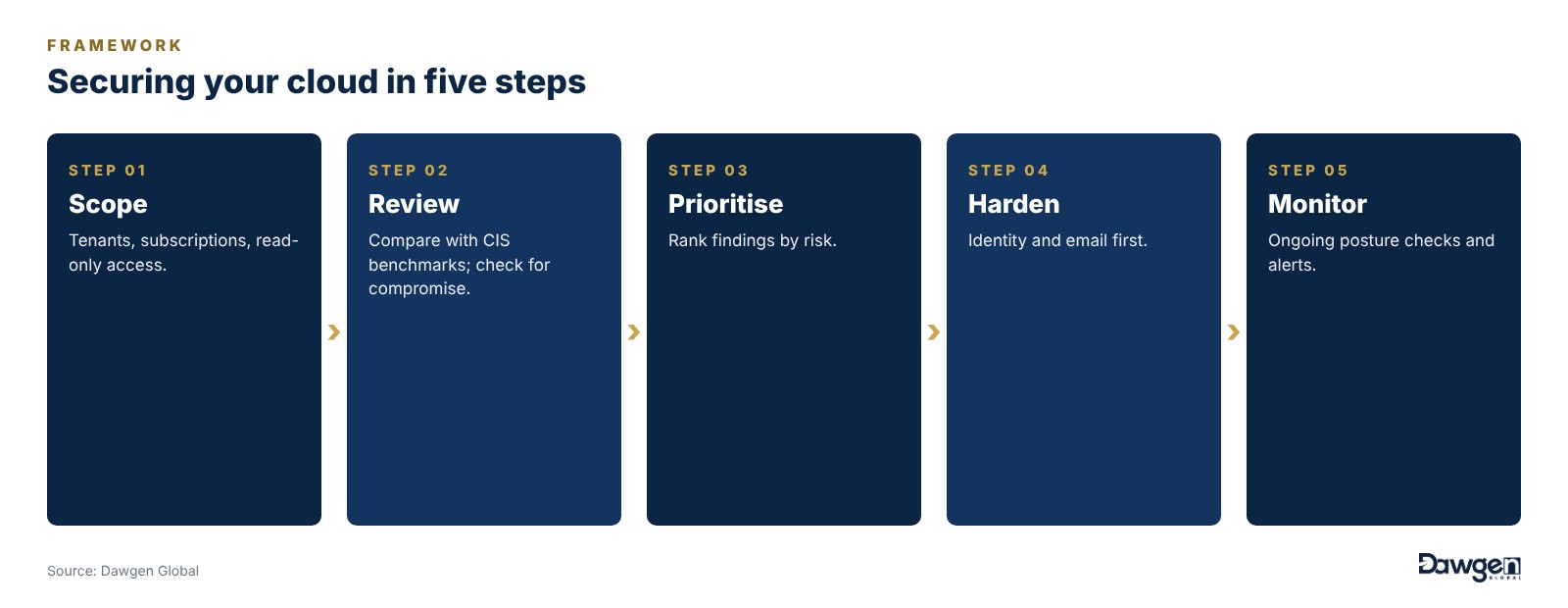
Figure 1. Securing your cloud in five steps
It starts with read-only access, so nothing changes until you approve it. The environment is compared with CIS benchmarks and provider best practice, and checked for signs of existing compromise such as suspicious inbox rules, unknown connected applications and unusual sign-in patterns. Findings are prioritised by risk, with clear steps to fix each one. The organisation’s IT team or provider then hardens the environment, usually starting with identity and email, where the biggest risks lie. Finally, ongoing monitoring and periodic reviews keep settings secure as people, systems and features change.
Quick wins
Several improvements can be made within the first month and deliver a large reduction in risk.
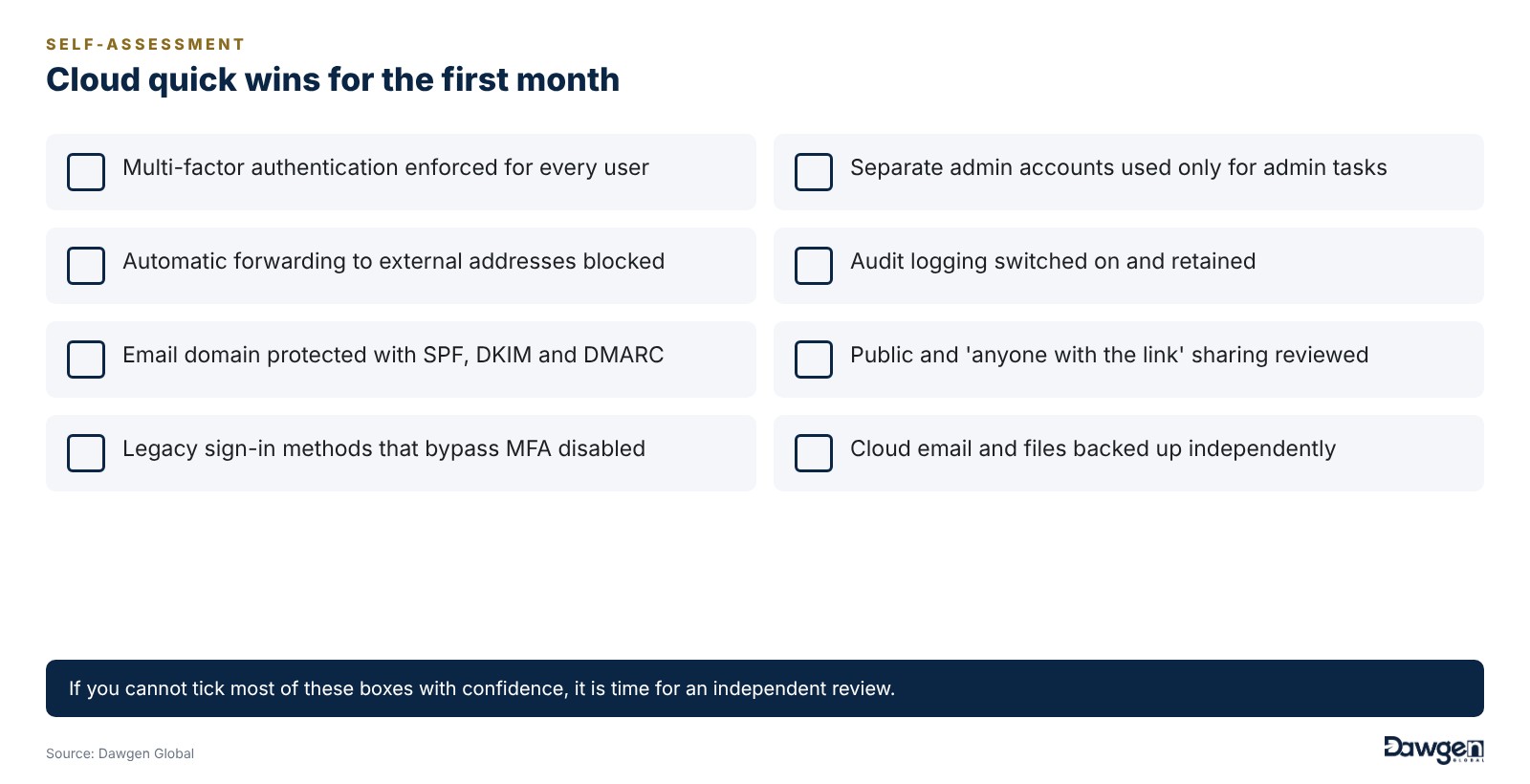
Figure 2. Cloud quick wins for the first month
A composite case: closing the door on email fraud
Returning to the professional services firm, consider what a cloud review found. Most users did not have multi-factor authentication. Several mailboxes had hidden forwarding rules, some created by attackers. Hundreds of files were shared with “anyone with the link”, including client documents. Audit logging was off, and the firm’s domain had no DMARC record, allowing anyone to send email in its name.
Working with the firm’s IT provider, the issues were fixed in stages. Multi-factor authentication was rolled out to every account, forwarding to external addresses was blocked, sharing settings were tightened, logging was enabled and email domain authentication was configured. The firm now has its settings reviewed every quarter, and its clients receive a clear warning never to accept bank detail changes by email alone.
Before you migrate
Organisations planning a move to the cloud have an opportunity to build security in from the start. A design review ensures the target environment has secure identity, sharing, logging and backup settings before data arrives. A migration plan moves data safely and controls access throughout. A review once systems are live confirms that settings match the design. Building security into a migration costs far less than fixing problems afterwards.
Common objections, answered
“Our IT provider set it up properly.” Many providers focus on getting systems working. Security settings may not have been in scope. A review provides independent assurance.
“Multi-factor authentication will annoy staff.” Modern authentication apps are quick and convenient, and conditional access can reduce prompts in trusted situations. The minor inconvenience is far outweighed by the protection.
“We are too small for cloud attacks.” Attacks on cloud email are largely automated. Attackers try leaked credentials against thousands of organisations at once, regardless of size.
Signs of compromise to check today
Many organisations have already been compromised without knowing it. A cloud review checks for signs such as inbox rules that forward or delete messages, sign-ins from countries where the organisation has no staff, third-party applications granted access to mailboxes or files, newly created administrator accounts and unusually large file downloads or sharing activity. Finding these early can prevent fraud and data loss.
Sector perspectives
For professional firms, client confidentiality and protection against payment fraud are the priorities, making email security and sharing controls essential.
For financial institutions, regulators expect strong identity controls, logging and data protection in cloud environments, along with careful management of cloud providers as critical suppliers.
For hotels and tourism groups, guest data, booking systems and seasonal staff accounts need careful access management.
For schools and colleges, large numbers of student and staff accounts make identity management and safe sharing settings especially important.
For public bodies, data residency, protection of citizen information and accountability to oversight bodies shape cloud security decisions.
Keeping secure as things change
Cloud platforms change constantly. New features appear, defaults shift and staff join and leave. A configuration that was secure last year may not be secure today. Regular posture reviews, alerts for risky changes and a simple process for approving new connected applications keep settings aligned with good practice. Connecting cloud logs to round-the-clock monitoring adds a further layer, so suspicious activity is spotted as it happens rather than weeks later.
Cloud and data protection
Data protection laws across the region apply to personal data wherever it is stored, including in the cloud. Organisations remain responsible for protecting that data, controlling who can access it and responding to breaches. Strong cloud security settings, combined with clear records of what personal data is held and where, support both security and compliance.
Conclusion
The cloud has given Caribbean organisations flexibility, resilience and access to enterprise technology that was once out of reach. But it has also moved the front line of security from the office firewall to every user account, mailbox and shared link.
A cloud security review is often the fastest and most cost-effective security improvement an organisation can make. The settings that matter most are within your control. The question is whether they have been switched on.
| TAKE THE NEXT STEP
Find and fix the settings attackers look for. Our Cloud Security Assessment & Hardening brochure explains how we review Microsoft 365, Google Workspace, Azure, AWS and Google Cloud against recognised benchmarks and help you fix what matters. Read the brochure: Cloud Security Assessment & Hardening — https://www.dawgen.global/service-brochure/cloud-security/ Talk to us: Request a cloud security review. Write to info@dawgen.global, or to your territory desk at territory@dawgen.com. |
About Dawgen Global
Dawgen Global is an independent, integrated multidisciplinary professional services firm headquartered at 47 Trinidad Terrace, New Kingston, Jamaica, serving 35 territories across the Caribbean. Founded and led by Dr. Dawkins Brown, Executive Chairman, the firm is independent and not affiliated with any international network. It delivers a full suite of professional services under one roof: audit and assurance; tax advisory; IT and digital transformation; risk management; cybersecurity; actuarial and insurance regulatory advisory; HR advisory; mergers and acquisitions; corporate recovery; business advisory and strategy; accounting BPO and virtual CFO services; and legal process outsourcing.
The proposition is simple: big-firm capability without the big-firm price. Dawgen Global’s integrated approach is built for the specific complexities and opportunities of the Caribbean market, helping organizations make sharper, better-informed decisions that drive measurable progress.
To explore a partnership, reach out:
- Website: dawgen.global
- Email: info@dawgen.global
- WhatsApp (Global): +1 555-795-9071
- Caribbean offices: +1 876-665-5926 | +1 876-929-3670 | +1 876-926-5210
Related service: Explore how we can help →